> For the complete documentation index, see [llms.txt](https://docs.payswap.org/llms.txt). Markdown versions of documentation pages are available by appending `.md` to page URLs; this page is available as [Markdown](https://docs.payswap.org/alarbyh/products/cancan/auction-and-bids-1.md).
# قطرات
تُمكّن PaySwap أيضًا من عرض المنتجات/المنتجات المُشتركة التي لا يمكن شراؤها مباشرة ويمكن شراؤها فقط بعد تاريخ معين للهبوط. فيما يلي دليل خطوة بخطوة للقيام بذلك:
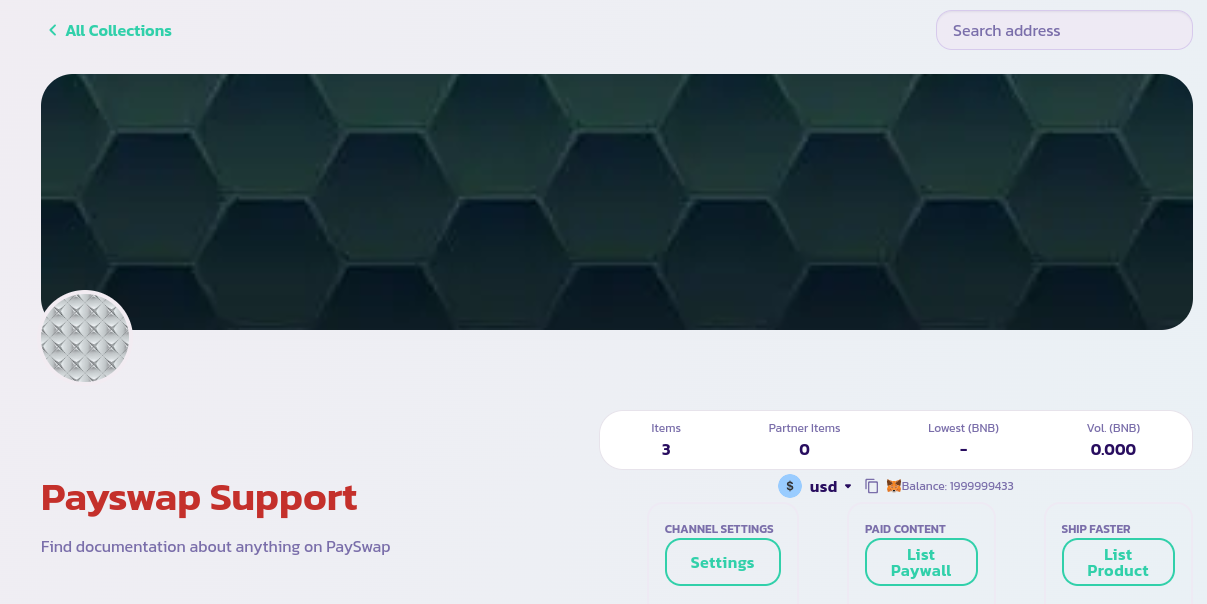
* انتقل إلى الصفحة الرئيسية لقناتك وانقر على زر **قائمة المنتج** (انقر على زر **قائمة حاجز الدفع** للمنتجات المشتركة)
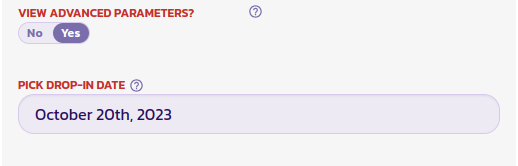
* قم بملء النموذج الذي يظهر وقم بتعيين حقل **عرض المعلمات المتقدمة** (في أسفل النموذج) إلى **نعم** لكشف الحقول التي ستحتاج إلى ضبط تاريخ الهبوط الخاص بك.
* في الصورة أدناه، قمنا بتعيين ذلك الوقت ليكون في 20 أكتوبر 2023 مما يعني بعد أن نحقق النموذج، سيتم سرد المنتج تمامًا مثل القائمة العادية ولكن المستخدمين سيكونون قادرين فقط على شرائه بعد تاريخ محدد.
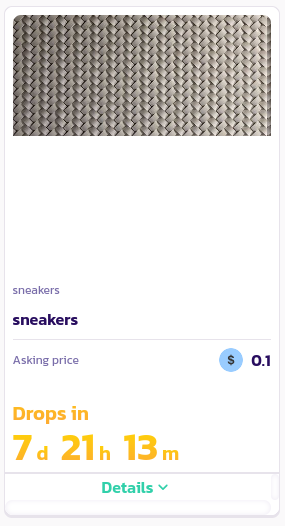
تهانينا! لقد قمت بتسجيل هبة بنجاح. يجب أن تتمكن من عرضها على الصفحة الرئيسية لقناتك إلى جانب المنتجات الأخرى الخاصة بك. تعرض المنتجات الهبوطية تواريخ هبوطها.