> For the complete documentation index, see [llms.txt](https://docs.payswap.org/llms.txt). Markdown versions of documentation pages are available by appending `.md` to page URLs; this page is available as [Markdown](https://docs.payswap.org/ri-ben-yu/products/revenue-sharing.md).
# 収益分配
.jpeg?alt=media) PaySwapには12個のトークンがあり、それぞれのワークスペースに1つずつ割り当てられています。これらのトークンはFree Tokensと呼ばれます:
| トークン名 | トークンのワークスペース |
| ---------------------------------------------- | ------------------- |
| Free Apparel & Beauty & Cosmetics Token (FABT) | アパレル&ビューティー&コスメティック |
| Free Beverage Token (FBT) | 飲料 |
| Free Culture & Entertainment Token (FECT) | カルチャー&エンターテイメント |
| Free Energy Token (FET) | エネルギー |
| Free Food Token (FFT) | 食品 |
| Free HealthCare Token (FHT) | ヘルスケア |
| Free Law & Order Token (FLOT) | 法と秩序 |
| Free Mining Token (FMT) | 採掘&リサイクリング |
| Free NSFW Token (FNT) | 非常に安全ではない |
| Free Real Estate Token (FRET) | 不動産 |
| Free Software & Telco & Other (FSTT) | ソフトウェア&電気通信&その他 |
| Free Transportation Token (FTT) | 交通 |
{% hint style="info" %}
前週からマーケットプレイスで生成されたユーティリティのレベルに応じて、無料トークンは週に1回鋳造または焼却されます。たとえば、前週に1000万トークンが取引され、今週に1100万が取引された場合、ミンターは現在の週の終わりに11M - 10M = 100万トークンを鋳造します。
一方、前週に1100万が取引され、今週に1000万が取引された場合、11M - 10M = -1Mトークンが鋳造され、つまり100万トークンが焼却されます。
ミンターの役割は、単にマーケットプレイスで取引されたトークンの数を追跡し、それらの取引を可能にするのに十分なトークンを提供することです。
{% endhint %}
## トークンのアドレスを取得する方法
* [Leviathans' page](https://payswap.org/leviathans)に移動し、トークンのシンボルを検索ボックスに入力します。
* 対応するリバイアサンのウィジェットが表示されますので、ウィジェットの詳細ボタンをクリックして詳細情報を表示します。リバイアサンのNFTトークンのアドレスは、ウィジェットの左側に表示されます。
PaySwapには12個のトークンがあり、それぞれのワークスペースに1つずつ割り当てられています。これらのトークンはFree Tokensと呼ばれます:
| トークン名 | トークンのワークスペース |
| ---------------------------------------------- | ------------------- |
| Free Apparel & Beauty & Cosmetics Token (FABT) | アパレル&ビューティー&コスメティック |
| Free Beverage Token (FBT) | 飲料 |
| Free Culture & Entertainment Token (FECT) | カルチャー&エンターテイメント |
| Free Energy Token (FET) | エネルギー |
| Free Food Token (FFT) | 食品 |
| Free HealthCare Token (FHT) | ヘルスケア |
| Free Law & Order Token (FLOT) | 法と秩序 |
| Free Mining Token (FMT) | 採掘&リサイクリング |
| Free NSFW Token (FNT) | 非常に安全ではない |
| Free Real Estate Token (FRET) | 不動産 |
| Free Software & Telco & Other (FSTT) | ソフトウェア&電気通信&その他 |
| Free Transportation Token (FTT) | 交通 |
{% hint style="info" %}
前週からマーケットプレイスで生成されたユーティリティのレベルに応じて、無料トークンは週に1回鋳造または焼却されます。たとえば、前週に1000万トークンが取引され、今週に1100万が取引された場合、ミンターは現在の週の終わりに11M - 10M = 100万トークンを鋳造します。
一方、前週に1100万が取引され、今週に1000万が取引された場合、11M - 10M = -1Mトークンが鋳造され、つまり100万トークンが焼却されます。
ミンターの役割は、単にマーケットプレイスで取引されたトークンの数を追跡し、それらの取引を可能にするのに十分なトークンを提供することです。
{% endhint %}
## トークンのアドレスを取得する方法
* [Leviathans' page](https://payswap.org/leviathans)に移動し、トークンのシンボルを検索ボックスに入力します。
* 対応するリバイアサンのウィジェットが表示されますので、ウィジェットの詳細ボタンをクリックして詳細情報を表示します。リバイアサンのNFTトークンのアドレスは、ウィジェットの左側に表示されます。
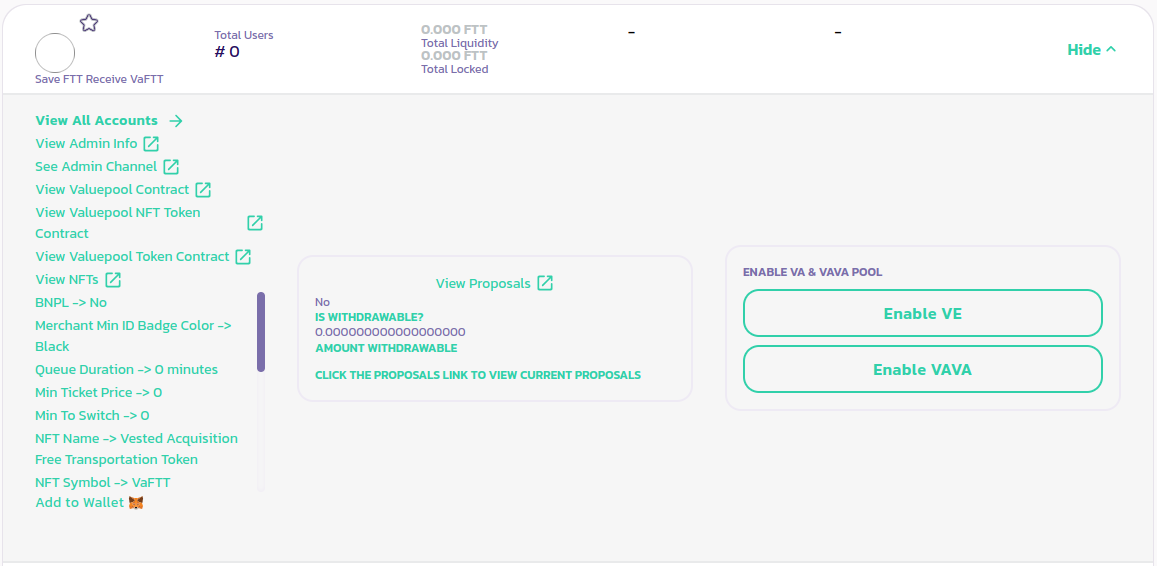 * **View Valuepool NFT Token Contract**リンクをクリックして、アドレス情報が記載されたページを開きます。
[コミュニティからさらなるサポートを受けるにはこちら。](https://paychat.payswap.org/#/room/%23paycom%3Amatrix.org?via=matrix.org)
* **View Valuepool NFT Token Contract**リンクをクリックして、アドレス情報が記載されたページを開きます。
[コミュニティからさらなるサポートを受けるにはこちら。](https://paychat.payswap.org/#/room/%23paycom%3Amatrix.org?via=matrix.org)