> For the complete documentation index, see [llms.txt](https://docs.payswap.org/llms.txt). Markdown versions of documentation pages are available by appending `.md` to page URLs; this page is available as [Markdown](https://docs.payswap.org/ri-ben-yu/products/revenue-sharing/contributors.md).
# 貢献者
週次プロトコル収益分配に参加する方法
.jpeg?alt=media) 貢献者の契約は、ミンターから週次エミッションを受け取ります。貢献者の契約に送信されるトークンの総数は、週間の貢献者の契約に行われた投票の数に依存します。
貢献者の契約に送信されるトークンは、貢献者が受け取る投票の数に応じて分配されます。
投票を得るために、貢献者は当社のマーケットプレイスのビジネスをさまざまな仕事で支援します:カスタマーサポート、ビジネスオンボーディング、拡張機能の構築、アパレル商人のためのバーチャルトライオンテクノロジー、仕立て屋のためのバーチャル計測技術など。
PaySwapエコシステムでのビジネスの支援に役立つもの、例えば、ソーシャルメディアチャンネルやニュースレターを開始して、ユーザーがPaySwapエコシステムで何が起こっているかや、どのようなビジネスがプラットフォームで展開されたかについて最新情報を提供する、PaySwap向けに異なるWeb /モバイルアプリを開始することなどです。
これは、ビジネスがその製品を理解し、使用するのを支援するか、特定のビジネス/ユースケースによりカスタマイズされたもう1つのWeb /モバイルアプリをPaySwap向けに構築することによって、オープンソースプロジェクトが資金を得る素晴らしい方法です。
貢献者がプラットフォーム上のビジネスをどれだけ助けるかに応じて、(またはコミュニティから)貢献者の契約における彼らの投票数が増え、週次エミッションのシェアが大きくなります。
貢献者ゲージを展開するには、[貢献者のページ](https://payswap.org/contributors)に移動し、**貢献者を展開** ボタンをクリックします。ポップアップするフォームを記入して検証してください
貢献者の契約は、ミンターから週次エミッションを受け取ります。貢献者の契約に送信されるトークンの総数は、週間の貢献者の契約に行われた投票の数に依存します。
貢献者の契約に送信されるトークンは、貢献者が受け取る投票の数に応じて分配されます。
投票を得るために、貢献者は当社のマーケットプレイスのビジネスをさまざまな仕事で支援します:カスタマーサポート、ビジネスオンボーディング、拡張機能の構築、アパレル商人のためのバーチャルトライオンテクノロジー、仕立て屋のためのバーチャル計測技術など。
PaySwapエコシステムでのビジネスの支援に役立つもの、例えば、ソーシャルメディアチャンネルやニュースレターを開始して、ユーザーがPaySwapエコシステムで何が起こっているかや、どのようなビジネスがプラットフォームで展開されたかについて最新情報を提供する、PaySwap向けに異なるWeb /モバイルアプリを開始することなどです。
これは、ビジネスがその製品を理解し、使用するのを支援するか、特定のビジネス/ユースケースによりカスタマイズされたもう1つのWeb /モバイルアプリをPaySwap向けに構築することによって、オープンソースプロジェクトが資金を得る素晴らしい方法です。
貢献者がプラットフォーム上のビジネスをどれだけ助けるかに応じて、(またはコミュニティから)貢献者の契約における彼らの投票数が増え、週次エミッションのシェアが大きくなります。
貢献者ゲージを展開するには、[貢献者のページ](https://payswap.org/contributors)に移動し、**貢献者を展開** ボタンをクリックします。ポップアップするフォームを記入して検証してください
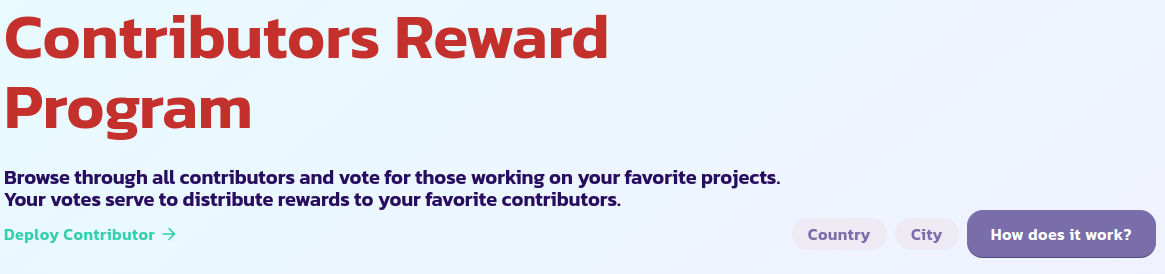 **Mine Only** オプションをチェックして新しい貢献者をページで視覚化できるはずです。できない場合は、ページをリロードして再試行してください。
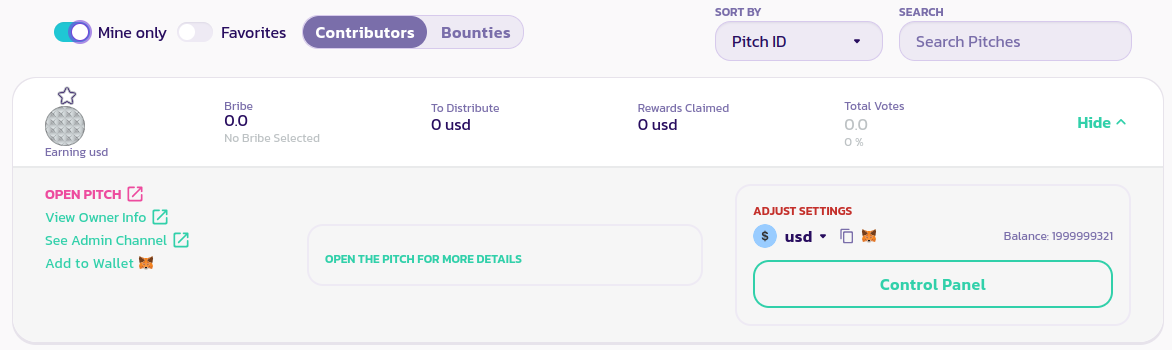 プラットフォーム上のビジネスを助ける方法の説明を残すには、**Open Pitch** ボタンをクリックし、以下のページの手順に従ってください:
{% content-ref url="/pages/6YGyLBIxxymsuLvUXy1I" %}
[アクセル](/ri-ben-yu/products/revenue-sharing/accelerator.md)
{% endcontent-ref %}
賄賂の追加についてのセクションも読んで、貢献者に賄賂を追加し、ユーザーにその貢献者に投票するように促す同じプロセスに従うことができます。
## 貢献者に投票する方法
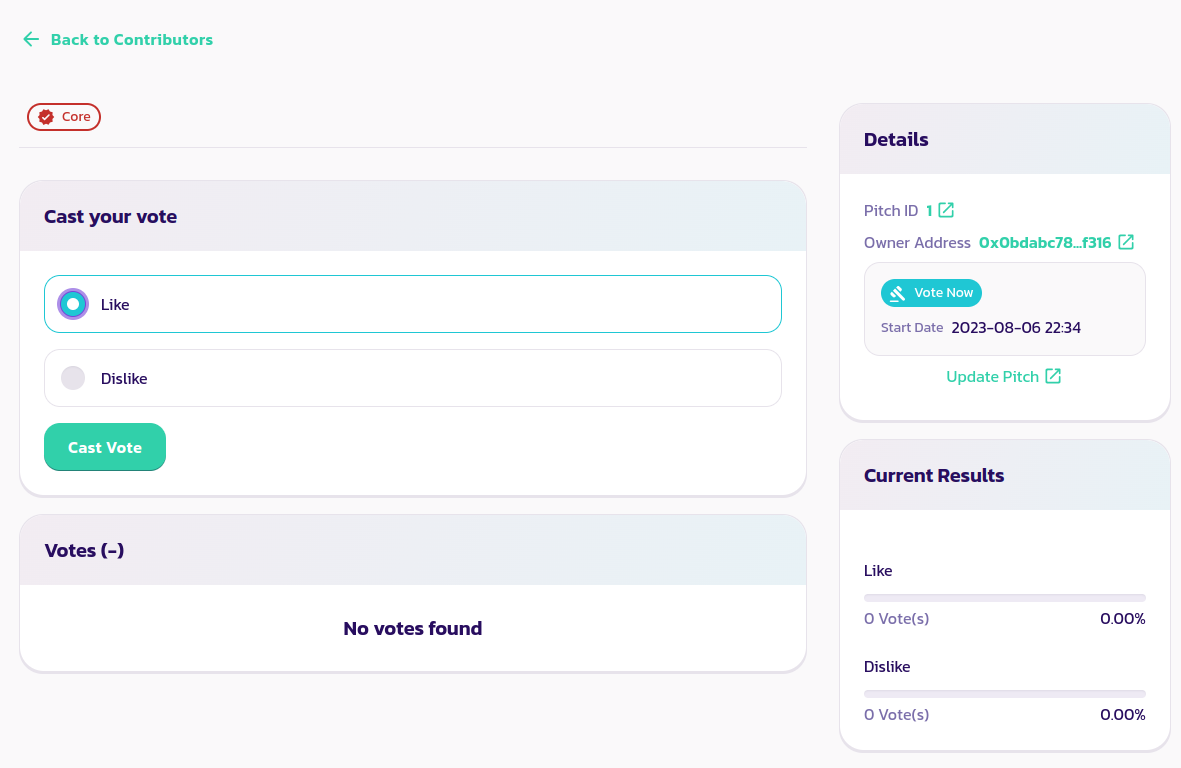
最初のステップは、[貢献者のページ](https://payswap.org/contributors)で貢献者を見つけ、そのパネルを展開して**Open Pitch** ボタンをクリックすることです。
これにより、投票ページに送られ、貢献者を好き/嫌いにすることができます。
プラットフォーム上のビジネスを助ける方法の説明を残すには、**Open Pitch** ボタンをクリックし、以下のページの手順に従ってください:
{% content-ref url="/pages/6YGyLBIxxymsuLvUXy1I" %}
[アクセル](/ri-ben-yu/products/revenue-sharing/accelerator.md)
{% endcontent-ref %}
賄賂の追加についてのセクションも読んで、貢献者に賄賂を追加し、ユーザーにその貢献者に投票するように促す同じプロセスに従うことができます。
## 貢献者に投票する方法
最初のステップは、[貢献者のページ](https://payswap.org/contributors)で貢献者を見つけ、そのパネルを展開して**Open Pitch** ボタンをクリックすることです。
これにより、投票ページに送られ、貢献者を好き/嫌いにすることができます。
 [コミュニティからさらなるサポートを受け取る](https://paychat.payswap.org/#/room/%23paycom%3Amatrix.org?via=matrix.org)