> For the complete documentation index, see [llms.txt](https://docs.payswap.org/llms.txt). Markdown versions of documentation pages are available by appending `.md` to page URLs; this page is available as [Markdown](https://docs.payswap.org/tieng-viet/products/cancan/paywalls/activating-paywall-subscriptions.md).

# Kích hoạt đăng ký Paywall

Việc đăng ký vào một tường thanh toán bao gồm hai bước:

* Mua một đăng ký
* Kích hoạt đăng ký

Khi chưa được kích hoạt, đăng ký không bắt đầu và một đăng ký trong vòng 1 tháng có thể được giữ trong nhiều tháng trước khi được kích hoạt. Điều này có thể cho phép nhà đầu tư đầu tư vào các tường thanh toán bằng cách mua (nhưng không kích hoạt) nhiều đăng ký từ các tường thanh toán đó và chờ đợi cho đến khi giá đăng ký đối với các tường thanh toán đó tăng giá để bán các đăng ký đã mua trước đó trên thị trường phụ cho người dùng muốn có một đăng ký rẻ hơn vào tường thanh toán.

### Kích Hoạt Một Đăng Ký

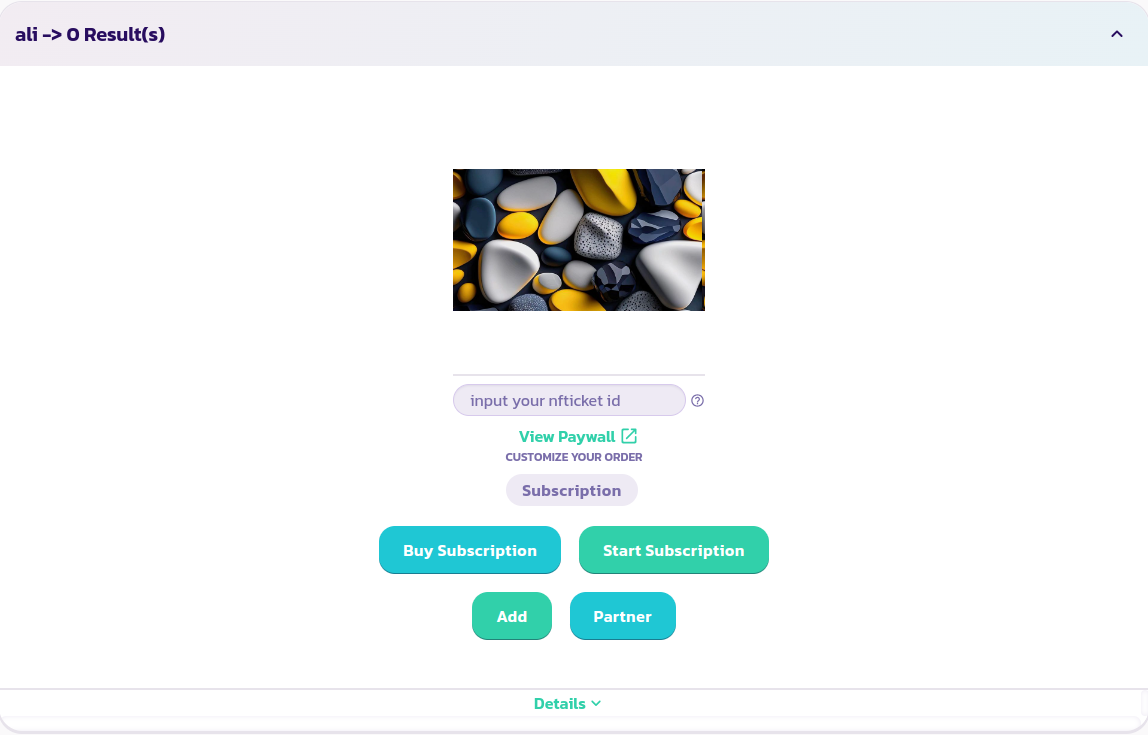
* Tìm và mở rộng tường thanh toán mà bạn muốn đăng ký

<figure><img src="/files/iozMLYas8oOIIf7G5H7y" alt=""><figcaption></figcaption></figure>

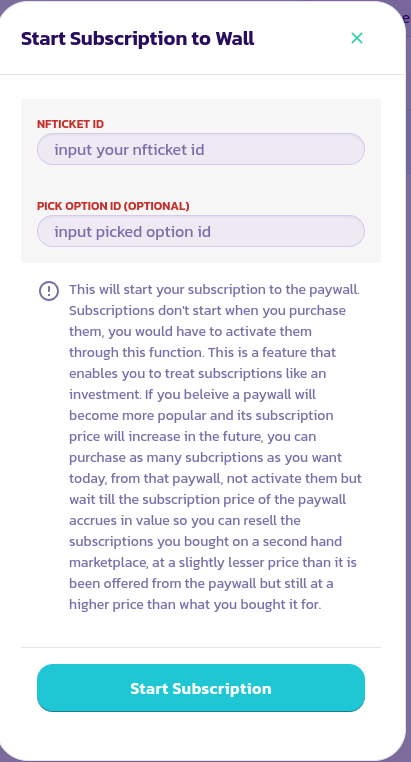
* Nhấp vào nút **Bắt Đầu Đăng Ký**, điền và xác nhận thông tin trong biểu mẫu xuất hiện.

<figure><img src="/files/vhulyjCOBkbTkBLZxSfi" alt=""><figcaption></figcaption></figure>

* Để xem nội dung đằng sau tường thanh toán, nhập id của NFTicket/eReceipt bạn nhận được từ việc mua đăng ký vào trường **Nhập id nfticket**. Điều này sẽ cho phép tường thanh toán phát hiện xem đăng ký của bạn có được kích hoạt hay không. Nếu tất cả các bước trước đó đã được hoàn thành thành công, bạn nên có thể thấy vài giây sau khi nhập id của bạn vào trường, tất cả nội dung của tường thanh toán của bạn

<figure><img src="/files/iozMLYas8oOIIf7G5H7y" alt=""><figcaption></figcaption></figure>

Chúc mừng! Bạn đã thành công trong việc bắt đầu một đăng ký

---

# Agent Instructions
This documentation is published with GitBook. GitBook is the documentation platform designed so that both humans and AI agents can read, navigate, and reason over technical content effectively. Learn more at gitbook.com.

## Querying This Documentation
If you need additional information that is not directly available in this page, you can query the documentation dynamically by asking a question.

Perform an HTTP GET request on the current page URL with the `ask` query parameter, and the optional `goal` query parameter:

```
GET https://docs.payswap.org/tieng-viet/products/cancan/paywalls/activating-paywall-subscriptions.md?ask=<question>&goal=<endgoal>
```

`ask` is the immediate question: it should be specific, self-contained, and written in natural language.
`goal` is optional and describes the broader end goal you are ultimately trying to accomplish on behalf of the user. GitBook uses it to tailor the answer towards what is most useful for that goal.

The response will contain a direct answer to the question and relevant excerpts and sources from the documentation.

Use this mechanism when the answer is not explicitly present in the current page, you need clarification or additional context, or you want to retrieve related documentation sections.