> For the complete documentation index, see [llms.txt](https://docs.payswap.org/llms.txt). Markdown versions of documentation pages are available by appending `.md` to page URLs; this page is available as [Markdown](https://docs.payswap.org/turkish/products/betting/bets-with-alpha-encoding.md).
# Alfabe kodlamalı bahisler
Bu bahis sözleşmeleri, kullanıcılardan yalnızca alfabe cevaplarını kabul eder. Temel akıllı sözleşme, kullanıcıların verdiği cevapları harflerden sayılara dönüştürür çünkü akıllı sözleşme yalnızca sayıları anlar.
Hadi bir spor bahis etkinliği ele alalım; burada kullanıcıları, bir sonraki golü atan oyuncunun adına bahis yapmaya teşvik etmeye çalışıyorsunuz. Çok fazla seçenek olduğundan, bu bahis etkinliğini alfabe kodlamalı hale getirmek ve kullanıcıların golü atan oyuncunun adını sağlamalarına izin vermek, tüm olası seçenekleri listeleyerek sunmaktan daha iyi bir fikir olabilir; çünkü bu seçenekler 20'den fazla farklı seçenek olabilir.
İşte böyle bir bahis etkinliği oluşturmanın adım adım kılavuzu:
* Bahis sözleşmenize gidin. Bahis sözleşmenizi nasıl dağıtacağınıza dair kılavuzu aşağıdaki sayfada okuyabilirsiniz:
{% content-ref url="/pages/5S5n9ga3jxuPSdwZCthY" %}
[Bahis Sözleşmeleri](/turkish/products/betting.md)
{% endcontent-ref %}
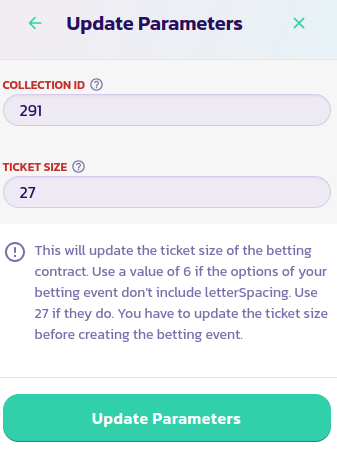
* Sözleşmenizin panelinde, Kontrol Paneli düğmesine tıklayın, ardından Parametreleri Güncelle düğmesine tıklayın. Bahis sözleşmenizin bilet boyutunu 27'ye, yani alfabedeki harf sayısına ayarlamamız gerekiyor.
* Bir sonraki adım, bahis sözleşmenizin kontrol paneli menüsüne geri dönüp **Etkinlik Oluştur/Güncelle** düğmesine tıklamaktır.
* Formdaki alanları uygun değerlerle doldurun ve **Alfabe Kodlama** alanının Evet olarak ayarlandığından emin olun.
* Formu doğrulayın ve işlemi onaylayın.
.png?alt=media)
.png?alt=media)
.png?alt=media)