# 手动奖励

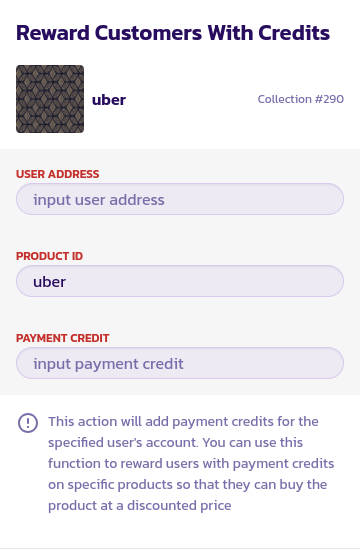
您还可以手动为用户添加积分，他们可以稍后提取现金或用于购买产品，具体取决于您的设置。要手动为用户添加奖励：

* 转到您希望向用户添加奖励的产品页面，并单击“调整设置”按钮。

<figure><img src="/files/kA1tEwCTLBYk8GrC22w6" alt=""><figcaption></figcaption></figure>

* 单击“向用户添加支付积分”按钮。

<div><figure><img src="/files/NnhnlOGZNZfhPdzn7rYh" alt=""><figcaption></figcaption></figure> <figure><img src="/files/GMBA9Sw1M1HQjJ67FnjR" alt=""><figcaption></figcaption></figure></div>

* 输入要向其添加积分/奖励的用户地址
* 当前物品的ID应该已经填好了，如果您想在不同的产品上添加奖励，可以将其更改为另一个产品
* 最后是您希望在当前产品上奖励指定用户的金额。如果产品价格为0.1美元，您希望向用户奖励一半的金额，则输入0.05美元；如果您希望向用户奖励产品的10倍，则只需输入1美元。


---

# Agent Instructions: Querying This Documentation

If you need additional information that is not directly available in this page, you can query the documentation dynamically by asking a question.

Perform an HTTP GET request on the current page URL with the `ask` query parameter:

```
GET https://docs.payswap.org/zhong-guo-ren/products/cancan/discounts/manual-rewards.md?ask=<question>
```

The question should be specific, self-contained, and written in natural language.
The response will contain a direct answer to the question and relevant excerpts and sources from the documentation.

Use this mechanism when the answer is not explicitly present in the current page, you need clarification or additional context, or you want to retrieve related documentation sections.