> For the complete documentation index, see [llms.txt](https://docs.payswap.org/llms.txt). Markdown versions of documentation pages are available by appending `.md` to page URLs; this page is available as [Markdown](https://docs.payswap.org/zhong-guo-ren/products/worlds.md).
# 世界赛
世界合同为用户提供了以下激励措施:
* 创建当前世界的数字双生体 - 红丸世界
* 提出对当前世界的替代方案 - 蓝丸世界
* 清洁/绿化当前世界 - 绿丸世界
世界合同使用[plus code](https://plus.codes)系统,这是一个开源的数字地址系统,用于全球范围内的激励措施。
要部署世界合同:
* 转到[世界页面](https://payswap.org/worlds),然后单击**部署世界**按钮
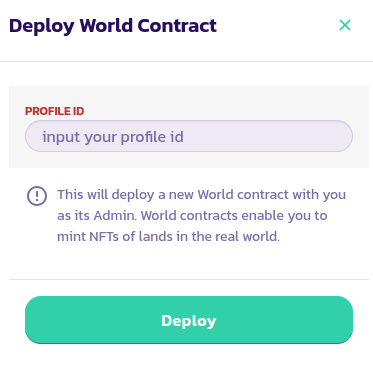
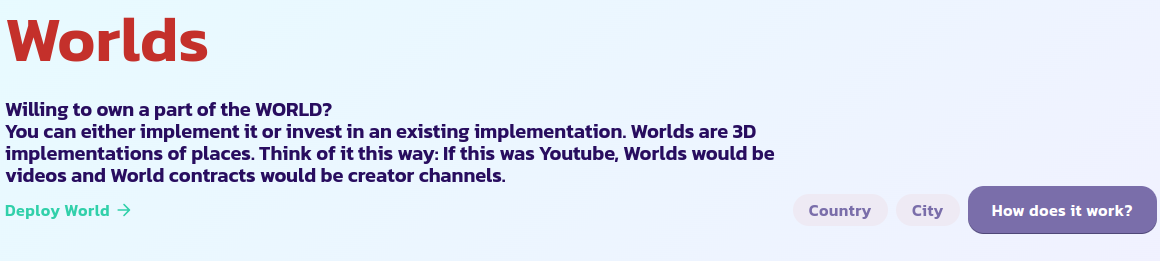 * 在弹出的表单中,输入您的个人资料 ID 并验证交易
 * 选择**仅自己**按钮,只显示您的世界合同;这样可以更快地找到您刚部署的世界合同。如果找不到,请重新加载页面并重试
 恭喜!您已成功部署了您的世界合同。下一步是将其设置为红丸世界、蓝丸世界或绿世界。
## 行星 ID
| 行星名称 | 行星 ID |
| ---- | ----- |
| 地球 | 1 |
| 金星 | 2 |
| 天王星 | 3 |
| 木星 | 4 |
| 火星 | 5 |
| 水星 | 6 |
| 土星 | 7 |
| 海王星 | 8 |
[在此处获取社区的进一步支持。](https://paychat.payswap.org/#/room/%23paycom%3Amatrix.org?via=matrix.org)
恭喜!您已成功部署了您的世界合同。下一步是将其设置为红丸世界、蓝丸世界或绿世界。
## 行星 ID
| 行星名称 | 行星 ID |
| ---- | ----- |
| 地球 | 1 |
| 金星 | 2 |
| 天王星 | 3 |
| 木星 | 4 |
| 火星 | 5 |
| 水星 | 6 |
| 土星 | 7 |
| 海王星 | 8 |
[在此处获取社区的进一步支持。](https://paychat.payswap.org/#/room/%23paycom%3Amatrix.org?via=matrix.org)