> For the complete documentation index, see [llms.txt](https://docs.payswap.org/llms.txt). Markdown versions of documentation pages are available by appending `.md` to page URLs; this page is available as [Markdown](https://docs.payswap.org/bangal/products/worlds.md).
# বিশ্ব
বিশ্ব চুক্তিগুলি ব্যবহারকারীদের জন্য প্রণোদনা তৈরি করে:
* বর্তমান বিশ্বের ডিজিটাল যমজ তৈরি করুন - রেড পিল ওয়ার্ল্ডস
* বর্তমান বিশ্বের বিকল্প প্রস্তাব করুন - ব্লু পিল ওয়ার্ল্ডস
* বর্তমান বিশ্বকে পরিষ্কার/সবুজ করুন - গ্রিন পিল ওয়ার্ল্ডস
বিশ্ব চুক্তি [প্লাস কোড](https://plus.codes) সিস্টেম ব্যবহার করে যা সমগ্র বিশ্বের জন্য একটি ওপেন-সোর্স ডিজিটাল অ্যাড্রেসিং সিস্টেম, বিশ্বের প্রতিটি অংশে প্রণোদনা তৈরি করতে।
একটি বিশ্ব চুক্তি স্থাপন করতে:
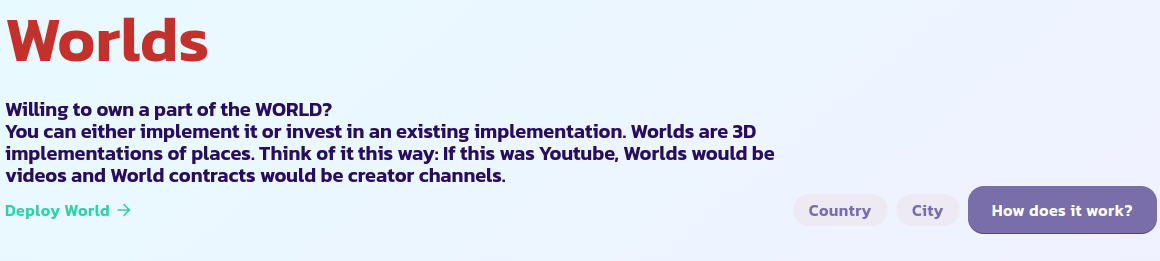
* [ওয়ার্ল্ডস পৃষ্ঠা](https://payswap.org/worlds) এ যান এবং **Deploy World** বোতামে ক্লিক করুন
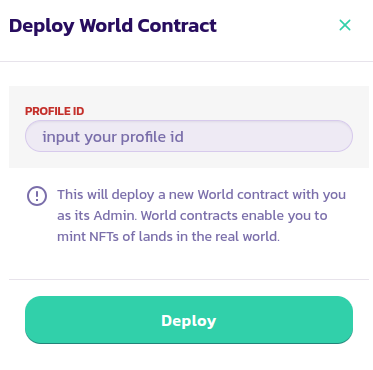
* যে ফর্মে পপ আপ, আপনার প্রোফাইল আইডি ইনপুট করুন এবং লেনদেনটি যাচাই করুন
* শুধুমাত্র আপনার বিশ্ব চুক্তিগুলি প্রদর্শন করতে **Mine Only** বোতামে টিক দিন; এটি আপনাকে বিশ্ব চুক্তিটি দ্রুত খুঁজে পেতে সক্ষম করবে যা আপনি এইমাত্র স্থাপন করেছেন। যদি আপনি এটি খুঁজে না পান, পৃষ্ঠাটি পুনরায় লোড করুন এবং আবার চেষ্টা করুন৷
অভিনন্দন! আপনি সফলভাবে আপনার বিশ্ব চুক্তি স্থাপন করেছেন. পরবর্তী ধাপ হল এটিকে রেড পিল ওয়ার্ল্ড, ব্লু পিল ওয়ার্ল্ড বা গ্রিন ওয়ার্ল্ড হিসাবে সেট আপ করা।
## প্ল্যানেট আইডি
| গ্রহের নাম | প্ল্যানেট আইডি |
| ---------- | -------------- |
| পৃথিবী | 1 |
| শুক্র | 2 |
| ইউরেনাস | 3 |
| বৃহস্পতি | 4 |
| মঙ্গল | 5 |
| বুধ | 6 |
| শনি | 7 |
| নেপচুন | 8 |
[এখানে সম্প্রদায় থেকে আরও সমর্থন পান।](https://paychat.payswap.org/#/room/%23paycom%3Amatrix.org?via=matrix.org)